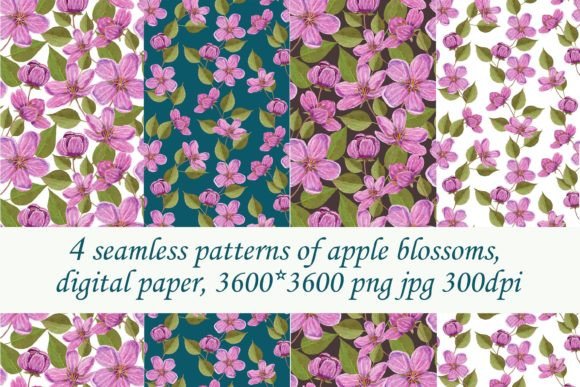
Seamless Patterns of Pink Apple Blossoms
If you’ve ever spent time designing a spring-themed invitation, refreshing your blog’s visual identity, or creating custom packaging for a small-batch skincare line—you know how much time and energy goes into finding the *right* background. Not just pretty, but purpose-built: scalable, versatile, and effortlessly repeatable. That’s where Seamless Patterns of Pink Apple Blossoms comes in—not as a decorative afterthought, but as a practical design asset built for real work.
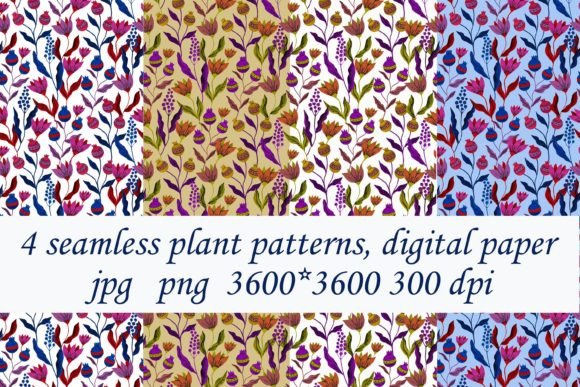
This digital download includes four distinct seamless patterns, each crafted at 3600 × 3600 pixels in both JPG and PNG formats, delivered at 300 dpi. They’re ready to drop into design software, print projects, or digital layouts—no resizing headaches, no pixelation, no awkward repeats. And because they’re truly seamless, they tile infinitely without visible edges or breaks—whether you’re covering a full A4 page or wrapping a 24-inch wide banner.
Where These Patterns Fit Into Real Creative Work
Think of these not as “just flowers,” but as flexible visual infrastructure. A pink apple blossom pattern doesn’t scream “spring”—it whispers warmth, delicacy, and quiet renewal. That subtlety is why it works across so many contexts where tone matters as much as aesthetics.
A freelance graphic designer used one of the patterns to build a cohesive brand suite for a local orchard-to-table bakery. Instead of commissioning custom illustrations, she layered the pattern behind product photos on Instagram Stories, applied it as a subtle watermark on recipe PDFs, and printed it on kraft paper gift tags—all with consistent color harmony and zero licensing friction.
In education, a high school art teacher downloaded the set to support a unit on surface pattern design. Students imported the files into Procreate and Illustrator, then deconstructed them—zooming in to study repeat logic, adjusting hue shifts to explore mood, or isolating blossoms to create new motifs. No subscription, no watermarks, no waiting for approvals: just immediate, classroom-ready material.
Use Cases That Go Beyond “Pretty Backgrounds”
- Small business branding: Use a soft pink apple blossom pattern as a textured overlay on website headers, email newsletter footers, or printable order confirmations—adding visual warmth without competing with text or calls to action.
- Digital planners & journals: Insert a low-opacity version behind weekly spreads in Notion or GoodNotes to gently reinforce seasonal themes—especially helpful for coaches, therapists, or educators guiding clients through intention-setting in spring.
- Print-on-demand products: Apply the patterns to notebook covers, tote bags, or ceramic mug mockups (using tools like Placeit or Smartmockups). Because the files are 3600 × 3600 and 300 dpi, they scale cleanly up to 12×12 inches without loss of fidelity.
- Educational handouts & worksheets: Teachers and curriculum designers use them as gentle borders or corner accents on printable learning materials—making worksheets feel more inviting for younger students or neurodivergent learners who respond well to organic, non-distracting visuals.
- Wedding stationery (non-traditional): Couples planning garden ceremonies or intimate elopements often seek refined botanical motifs that avoid cliché. These patterns offer elegance without formality—ideal for save-the-dates, seating charts, or digital RSVP cards.
Why Format and Resolution Actually Matter—Not Just “Look Nice”
You might wonder: why specify 3600 × 3600 pixels and 300 dpi? It’s not about technical bragging—it’s about flexibility in practice. At that size, you can confidently:
- Print an 8×8 inch square at full resolution (since 3600 ÷ 300 = 12 inches, giving you room to crop or bleed).
- Scale down for web use without quality loss—even at 25% size, you still have crisp detail for retina displays.
- Import into Canva, Adobe Express, or Figma and adjust blending modes (multiply, overlay, soft light) to integrate smoothly with photos or typography.
The inclusion of both JPG and PNG gives you options: use JPG for fast-loading web backgrounds where transparency isn’t needed; choose PNG when you want to layer over colored backgrounds or add drop shadows in editing tools.
What to Keep in Mind Before You Download
These are digital papers—not templates, not layouts, and not editable vector files. What you see is what you get: four high-res, tileable raster patterns. That means:
- You won’t get pre-made social media posts, business card designs, or Canva templates. Those require layout work—and intentionally so. The goal is to give you raw, reliable assets you control—not prescriptive designs that limit your voice.
- Colors may shift slightly depending on your monitor calibration or printer profile. If color accuracy is mission-critical (e.g., for branded merchandise), test-print a small section first.
- Because these are seamless raster files—not vector repeats—they’re best suited for static applications. If you need infinite scalability for massive murals or embroidery digitizing, vector-based alternatives would be more appropriate.
Who Benefits Most—and How
A blogger launching a mindful living course used one pattern as a recurring visual motif across her course landing page, workbook cover, and downloadable reflection journal. Consistency wasn’t about branding alone—it created a sense of continuity for students moving between digital and printed touchpoints.
A hobbyist embroiderer scanned one of the patterns into her embroidery software, used it as a guide for transferring a repeat motif onto linen, then stitched a series of matching hoop art pieces for a spring craft fair. She didn’t need permission—just clarity, resolution, and rhythm.
An indie publisher chose a lighter-weight version of the pattern as endpaper for a poetry chapbook themed around growth and quiet change. Readers noticed the texture before they read the first line—it set the emotional temperature of the book without a single word.
Even if you’re not a “designer,” these patterns lower the barrier to making things feel intentional. You don’t need advanced skills to apply them meaningfully—you just need a clear sense of context, a basic editing tool (even Preview or Paint.NET works), and a few minutes to experiment.
Final Thought: Design Assets Should Serve Your Work, Not Define It
Seamless Patterns of Pink Apple Blossoms isn’t about chasing trends or filling empty space. It’s about having a quietly capable tool on hand—ready when you need softness, cohesion, or seasonal resonance. Whether you’re sending a client proposal, prepping a classroom activity, updating your Etsy shop banners, or simply making your digital planner feel more like *yours*, these patterns do the quiet work of holding space—so your message, your craft, or your idea stays front and center.