Seamless Patterns with Spiders
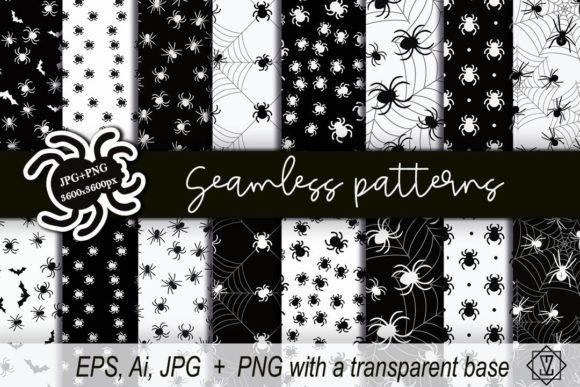
Seamless Patterns with Spiders is a precision-crafted digital asset pack designed for creators who value flexibility, consistency, and visual impact—without sacrificing workflow efficiency. It’s not just decorative; it’s functional infrastructure for design systems, branding projects, print production, web interfaces, and physical product development. At its core, this collection delivers 12 high-resolution, production-ready spider motifs: six rendered in crisp white on solid black, and six in pure black on fully transparent backgrounds. Each pattern repeats flawlessly edge-to-edge, eliminating visible seams across any scale or surface.
How It Fits Into Your Creative Process
Unlike static textures or one-off illustrations, Seamless Patterns with Spiders is built to integrate at multiple stages of a project—not as an afterthought, but as a deliberate, repeatable component. Before starting a branding refresh, you might sample the black-on-transparent spiders over your client’s primary palette to test contrast, rhythm, and tonal balance. During layout development for packaging or merch, the white-on-black variants serve as bold background anchors—especially effective for labels, apparel tags, or editorial spreads where legibility and hierarchy matter. After finalizing a website design, you can apply the transparent spiders as subtle hover-state overlays or section dividers, reinforcing theme without competing with content.
This dual-background structure means the patterns don’t lock you into a single aesthetic. You’re not choosing between “spider motif” and “your brand colors”—you’re choosing how the motif interacts with them. That distinction transforms what could be a decorative element into a responsive design tool.
Practical Integration Across Platforms and Workflows
The file organization supports real-world use—not theoretical idealism. You receive two clearly labeled folders: one containing EPS, AI, and JPG files of white spiders on black; the other holding EPS, AI, and PNG files with black spiders on full transparency. Raster files are delivered at 3600×3600 px—a size that scales cleanly for both screen and large-format print, while remaining manageable in most design applications.
For vector-based workflows (Adobe Illustrator, Affinity Designer), the EPS and AI files retain full editability: adjust stroke weight, recolor individual legs, or isolate specific spiders to build custom arrangements. For pixel-perfect compositing in Photoshop, Figma, or Canva, the PNGs preserve alpha channels, allowing instant blending over gradients, photos, or textured layers. The JPGs provide fast previews and lightweight embedding in presentations or mood boards—no need to open heavy vector files just to check alignment or density.
If you’re building a design system for a small business, these patterns slot directly into token libraries: define a “dark mode background” using the white-on-black set, and a “light mode accent layer” using the transparent black version. Educators creating science-themed slide decks can overlay spiders subtly behind headings to reinforce thematic continuity—without distracting from learning objectives. Marketers running seasonal campaigns (Halloween, natural history promotions, even cybersecurity awareness) gain consistent visual language across email headers, social banners, and landing pages—all from the same source files.
Preparation and Compatibility Considerations
No special plugins or software versions are required—but knowing your environment helps maximize utility. All AI files are saved in CS6-compatible format, ensuring backward compatibility with older installations. PNGs use sRGB color space and non-interlaced encoding for predictable rendering across browsers and CMS platforms. EPS files include embedded previews, making them reliably visible in Adobe Bridge or Finder/Explorer thumbnails.
Before deploying, test one pattern at your intended output size. Zoom to 200% in your layout app and pan across tile boundaries: if no misalignment, doubling, or faint seam lines appear, the pattern is ready. This simple quality check prevents rework later—especially important when scaling to fabric prints or wall murals where repetition errors become magnified.
Workflow Examples You Can Adapt Today
- Branding a Nature-Focused Startup: Apply the black spiders on transparent background over a soft beige linen texture in Figma. Adjust opacity to 12% for subtlety. Use the same layer style across all UI states—hover, active, disabled—to unify interaction feedback visually.
- Creating Limited-Edition Stationery: Import the white-on-black JPG into InDesign. Set it as a master page background, then place die-cut windows or foil-stamped text on top. The high-contrast base ensures ink coverage remains crisp, even on uncoated paper stocks.
- Developing an Educational Poster Series: Overlay the transparent spiders in Photoshop over macro photography of real spiderwebs. Use layer masks to reveal spiders only along web strands—creating a hybrid illustration that bridges realism and graphic interpretation.
- Building a Shopify Theme Section: Upload the PNG to your theme assets folder. Reference it in CSS via
background-image, then control tiling behavior withbackground-repeat: repeat;and scale withbackground-size. No JavaScript needed—just reliable, performant CSS.
Long-Term Usability and Organization
Treat these files like reusable components—not disposable downloads. Rename them consistently (e.g., spider_transparent_black_v1.png, spider_solid_white_v2.ai) and store them in a dedicated “Patterns/Textures” subfolder within your main design assets library. Tag them in Adobe Bridge or your DAM with keywords like “seamless,” “arachnid,” “monochrome,” and “repeat.” Doing so makes retrieval faster during tight deadlines—and ensures team members can locate and use them without asking for instructions.
Because each variant serves a distinct technical purpose, avoid merging folders or renaming files arbitrarily. Keep the black-on-transparent set separate from the white-on-black set—even if you plan to invert one later. Preserving the original intent maintains clarity when revisiting files months later or handing off to a collaborator.
What Makes This More Than Just Another Pattern Pack
It’s the combination of intentional duality and production-grade delivery. Many seamless pattern sets offer only one background option—forcing compromises in contrast, accessibility, or integration speed. Seamless Patterns with Spiders anticipates how you’ll actually use the files: sometimes you need absolute contrast control (white on black); other times, you need maximum compositional freedom (black on transparent). The inclusion of both raster and vector formats—each sized and encoded for specific use cases—means less time converting, more time executing.
There’s also quiet attention to detail in the spider designs themselves: balanced negative space, uniform stroke consistency, and anatomically plausible poses that avoid cartoonish exaggeration. This matters when patterns appear at large scale or in professional contexts where credibility and tone align with subject matter—say, a museum exhibit on arachnids or a sustainable textiles brand highlighting natural forms.
Finally, the package respects your time. No watermarks. No forced attribution. No hidden upsells. Just two clean folders, clear naming, and files that do exactly what they say—reliably, repeatedly, and without friction.
If you’re evaluating whether Seamless Patterns with Spiders fits your current or upcoming work, ask yourself: Do I need a motif that works equally well on dark interfaces and light surfaces? Will this asset save me time across more than one project? Does the file structure match how I organize and retrieve design resources day-to-day? If the answer to two or more is yes, it’s not just compatible—it’s operational.